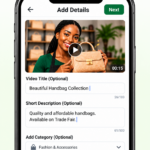
How  to open a shop?

Welcome to the Trade Fair community! Setting up your shop is free and easy. Follow these steps to get started:

  1. Free Registration: Click the button below to register as a vendor. It’s completely free!
  2. Shop Setup: Once approved, access your dashboard to set up your shop name, logo, and description.
  3. List Your Products: Add your products with clear images and descriptions to attract buyers.
  4. Get Customers: Share your shop link and participate in Trade Fair events to grow your business.

Go to Vendor Onboarding

How  to open a shop?

Step 1: Open T-Fair
Use your Android phone, iPhone, iPad or laptop. Open your internet browser, such as Chrome or Safari.
Visit cerfconnect.org.

Step 2:

Select “Open Vidoe/Camera Icon ”
Click the camera icon, make a short video of your product oe services,

Step 2:

Select “Open Vidoe/Camera Icon ”
Click the camera icon, make a short video of your product oe services,

Step 2:

Select “Open Vidoe/Camera Icon ”
Click the camera icon, make a short video of your product oe services,

Step 2:

Select “Open Vidoe/Camera Icon ”
Click the camera icon, make a short video of your product oe services,

Step 2:

Select “Open Vidoe/Camera Icon ”
Click the camera icon, make a short video of your product oe services,

Step 2:

Select “Open Vidoe/Camera Icon ”
Click the camera icon, make a short video of your product oe services,